
Table of Contents
DDoS attacks are a serious threat to websites, applications, and online services, making your website completely inaccessible and potentially impacting revenue and reputation.
Understanding how to stop a DDoS attack requires not only knowing the steps to mitigate it but also understanding how these attacks work and why certain strategies are effective.
How DDoS Attacks Work
A DDoS attack is essentially an attempt to flood your online services with traffic so that legitimate users cannot access them.
Imagine your website as a small coffee shop. ☕ Normally, the number of visitors is manageable. Now imagine thousands of people suddenly crowding in, all ordering drinks at once. Your staff cannot keep up, and legitimate customers are turned away.
Attackers usually control multiple compromised computers or IoT devices, forming a botnet. They send massive amounts of traffic to overwhelm servers, networks, or applications.
DDoS attacks generally fall into three categories:
-
Volumetric attacks (L3/L4): Flood the network with a sheer volume of data, consuming available bandwidth.
Example: UDP floods, ICMP floods (Ping floods), DNS amplification attacks. -
Protocol attacks (L3/L4): Exploit weaknesses in communication protocols to exhaust server or firewall resources. Example: SYN floods.
Examples: SYN floods, Ping of Death, Smurf attacks, fragmented packet attacks. -
Application-layer attacks (L7): Target specific applications by mimicking legitimate user behavior, making detection more difficult. Example: HTTP request floods.
Examples: HTTP GET/POST floods, slowloris attacks, XML-RPC floods, WordPress admin login floods
Understanding these distinctions is critical because each type requires a slightly different mitigation strategy.
What Are the Signs of a DDoS Attack?
Early detection is critical to reducing impact. Look out for:
- Sudden traffic spikes from unusual locations.
- Slower website or application performance.
- Server overload, including high CPU or memory usage.
- Connectivity problems, like intermittent outages or timeouts.
How to Stop a DDoS Attack
Stopping a DDoS attack requires a layered approach, separating malicious traffic from legitimate users while maintaining service availability.
1. Detect the Attack Early
- Why it matters: Early detection allows faster mitigation, reducing downtime.
- How it works: Use analytics tools to monitor for abnormal traffic patterns, unusual request rates, or repeated access from the same IP.
- Practical tip: Set up real-time alerts to notify your team immediately when traffic exceeds expected thresholds.
2. Filter Malicious Traffic
- Why it matters: Blocking malicious traffic preserves resources for legitimate users.
- How it works: Firewalls or access control lists (ACLs) block suspicious IPs or ranges. Advanced systems analyze behavior to differentiate bots from humans.
- Practical tip: Filtering is most effective near the network edge, ideally at your ISP or through a cloud provider.
3. Implement Rate Limiting
- Why it matters: Attackers often rely on repeated requests to overwhelm your server. Rate limiting slows them down.
- How it works: Restrict the number of requests per IP per time period. Excess requests are blocked or delayed.
- Practical tip: Particularly effective against application-layer attacks like HTTP floods or login attempts.
4. Use Traffic Scrubbing Services
- Why it matters: High-volume attacks can saturate your firewall or server. Scrubbing removes malicious traffic before it reaches your network.
- How it works: Traffic is routed through a cloud-based DDoS mitigation service that inspects and filters each request.
- Practical tip: Many providers offer automatic scrubbing, which reacts faster than manual interventions.
5. Scale Your Infrastructure
- Why it matters: If your servers can handle more traffic temporarily, the attack impacts fewer legitimate users.
- How it works: Increase server capacity, bandwidth, or deploy additional cloud nodes.
- Practical tip: Combine scaling with scrubbing; otherwise, scaling alone may just give attackers more resources to overwhelm.
6. Segmentation and Isolation
- Why it matters: Protect critical services from collateral damage.
- How it works: Move sensitive services (e.g., payment systems, databases) to separate networks or servers. Attack traffic is directed to less critical endpoints.
- Practical tip: Segmentation ensures core functions remain online even if other systems are affected.
7. Continuous Post-Attack Analysis
- Why it matters: Every attack reveals patterns and vulnerabilities. Learning from each incident strengthens defenses.
- How it works: Analyze logs for attack vectors, sources, and traffic patterns. Update firewalls, rate limits, and mitigation rules based on findings.
- Practical tip: Maintain a DDoS response playbook for faster reactions in future incidents.
Can You Recover from a DDoS Attack?
Yes, but the speed and effectiveness of recovery depend on preparedness:
- Identify and isolate malicious traffic.
- Restore services from backups or redundant systems if needed.
- Analyze attack patterns to improve defenses.
Preparation—including monitoring, redundancy, and automated mitigation—reduces downtime and ensures continuity.
DDoS Attack Prevention Tools
Preventing DDoS attacks requires a layered defense, where different tools handle different types of threats.
-
Firewalls and Next-Generation Firewalls: Block known malicious IPs and filter suspicious traffic before it reaches your server. They’re effective against simple volumetric attacks.
-
Web Application Firewalls (WAFs): Protect your web applications by detecting malicious HTTP requests, such as login floods or slow POST attacks. They are essential for application-layer attacks.
-
Content Delivery Networks (CDNs): Distribute your content across multiple servers globally, reducing the load on your main server and absorbing traffic spikes during attacks.
-
Cloud-Based DDoS Mitigation Services: Automatically detect and filter attack traffic at scale, useful for high-volume or multi-vector attacks.
-
Rate Limiting and Monitoring Tools: Limit requests per IP and continuously monitor traffic to detect anomalies early.
How CDNetworks Helps Prevent DDoS Attacks
Maintaining comprehensive protection against DDoS attacks presents significant challenges: evolving threats, operational complexity, false positives, large traffic volumes, and resource demands.
CDNetworks Flood Shield 2.0 addresses these challenges directly, delivering a cloud-native, AI-powered, always-on defense for enterprises.
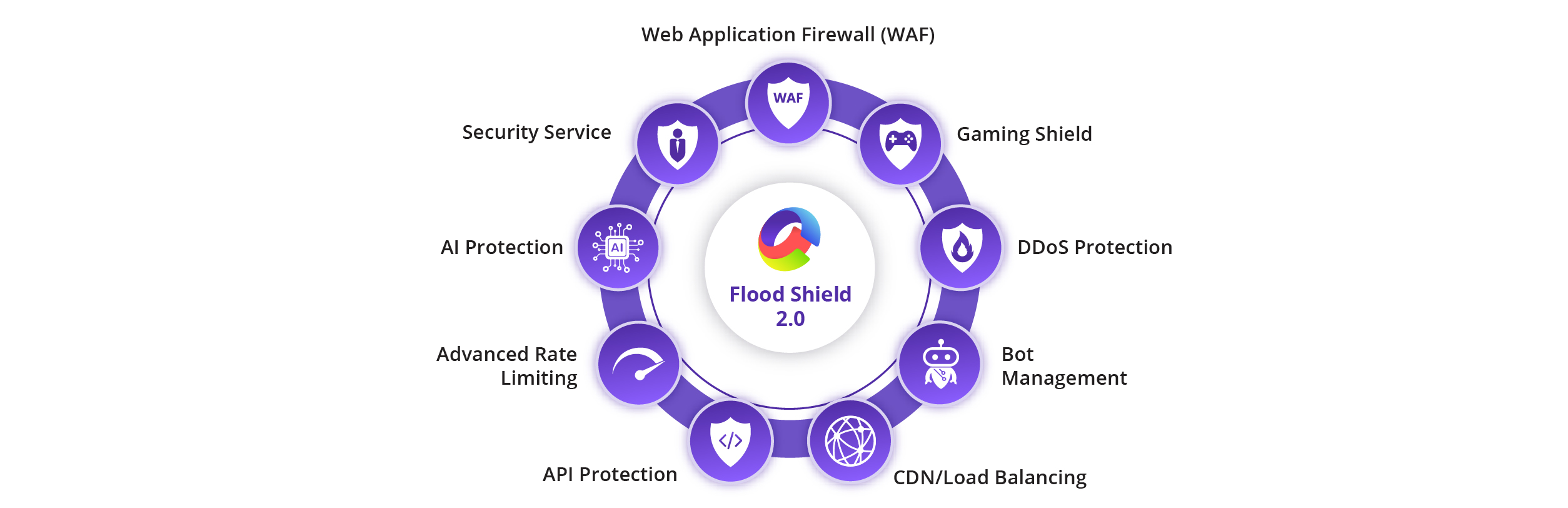
The key benefits of Flood Shield 2.0 include:
1. Lowers Operational Burden
Flood Shield 2.0 runs on a cloud-native architecture, eliminating the need for manual activation or on-premises hardware. Enterprises can rely on automatic detection and mitigation of L3/L4 and L7 attacks, reducing the operational load on internal security teams.
2. Simplifies Complexity
With integrated Web Application and API Protection (WAAP), Flood Shield 2.0 handles network, application, and bot-driven attacks seamlessly. AI-powered detection and automated traffic scrubbing ensure protection is active at all times without manual configuration.
3. Reduces False Positives
The AI engine continuously profiles traffic and identifies suspicious patterns in real time. This ensures malicious traffic is blocked while legitimate users can access applications and APIs without disruption.
4. Continuously Evolves
Flood Shield 2.0 adapts to new and emerging threats, using global threat intelligence and machine learning to detect multi-vector and zero-day attacks. The system updates dynamically to stay ahead of sophisticated attack trends.
5. Resource Efficient
With 40+ global scrubbing centers and over 20 Tbps mitigation capacity, Flood Shield 2.0 absorbs massive attacks at the edge, keeping origin servers unaffected. This global infrastructure ensures low latency, operational continuity, and seamless user experience even during large-scale attacks.
6. 24/7/365 Expert Support
CDNetworks provides around-the-clock monitoring and support, ensuring immediate response to any attack scenario, no matter the time of day. Enterprises can maintain uptime and customer trust without worrying about attack windows or off-hours incidents.
Flood Shield 2.0 combines AI-driven detection, global scrubbing, WAAP features, and cloud-native architecture into a single solution, giving enterprises resilient, always-on protection against modern DDoS threats. Sign up for a free trial to learn more →
Frequently Asked Questions
1. What is the solution for a DDoS attack?
A multi-step approach: detect, filter traffic, rate limit, scrub, scale infrastructure, and isolate critical services. Together, these measures maintain continuity and minimize disruption.
2. Why are DDoS attacks dangerous?
DDoS attacks are dangerous because they disrupt normal operations. They can make websites and applications unavailable, slow down critical services, and prevent real users from accessing resources.
In addition to immediate downtime, DDoS attacks can damage reputation, reduce revenue, and expose system vulnerabilities, which attackers may exploit in later attacks. Even a short outage can have significant consequences for businesses that rely on online services.
3. How long does a DDoS usually last?
From minutes to days. Some attacks are persistent or repeated, highlighting the need for ongoing monitoring.
4. Can a DDoS be stopped?
Yes, with early detection and layered defenses, attacks can be mitigated or neutralized.
5. Can a firewall stop a DDoS attack?
A firewall alone is rarely sufficient for large-scale or application-layer attacks. It is most effective as part of a broader defense strategy.