what-is-a-cdn
headless
Table of Contents
What is a CDN (Content Delivery Network)?
A Content Delivery Network (CDN) is a globally distributed network of servers that delivers web content to users from the nearest or most optimal location.
Instead of loading a website from a single origin server, a CDN caches and serves content from edge servers closer to users. This reduces latency, speeds up load times, and improves reliability.
In simple terms, a CDN makes websites faster, more scalable, and more resilient.
You can think of a CDN like having multiple copies of your website stored in different locations, so users always access the fastest version available.
Without a CDN, all requests are handled by a single origin server, which can lead to slower performance and scalability limitations for users in different regions.
Do You Really Need a CDN?
A CDN is especially useful for websites that serve users across multiple geographic regions, handle high traffic volumes, or require consistently fast load times.
You likely need a CDN if:
- Your users are located in multiple countries or regions
- Your website loads slowly in certain locations
- You serve large assets like images, videos, or APIs
- You experience traffic spikes or rapid growth
For most modern applications, especially SaaS, media, and e-commerce platforms, a CDN is a standard part of production infrastructure.
How Does a CDN Work?
A CDN works by delivering website content through distributed edge servers instead of relying solely on a single origin server. For a deeper technical breakdown, see how content delivery networks work.
1. Request Routing (Anycast and DNS)
When a user requests a webpage, the CDN directs the request to the nearest available edge server. This decision is based on factors such as geographic location, network conditions, and server health.
Technologies like DNS-based routing and Anycast help ensure the lowest-latency path between the user and the server.
DNS resolves a user’s request by translating a domain into an IP address before traffic is routed to a server.
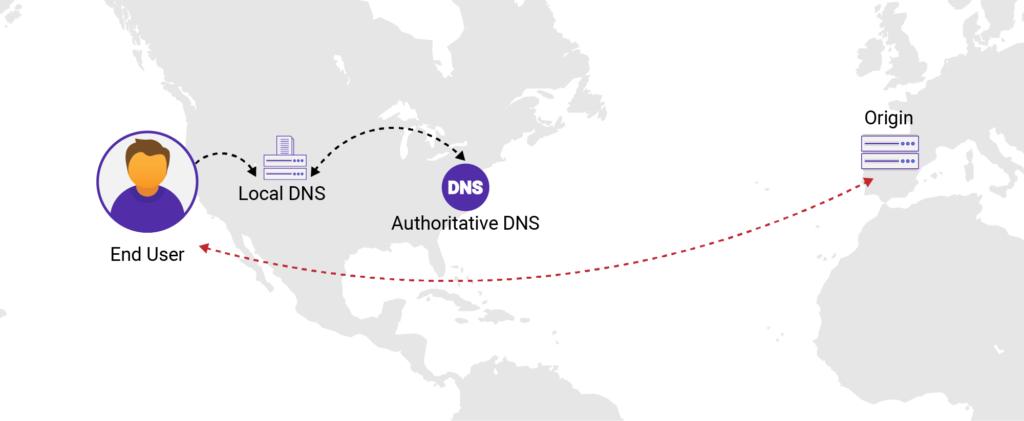
DNS resolves a user’s request by translating a domain into an IP address before traffic is routed to a server.
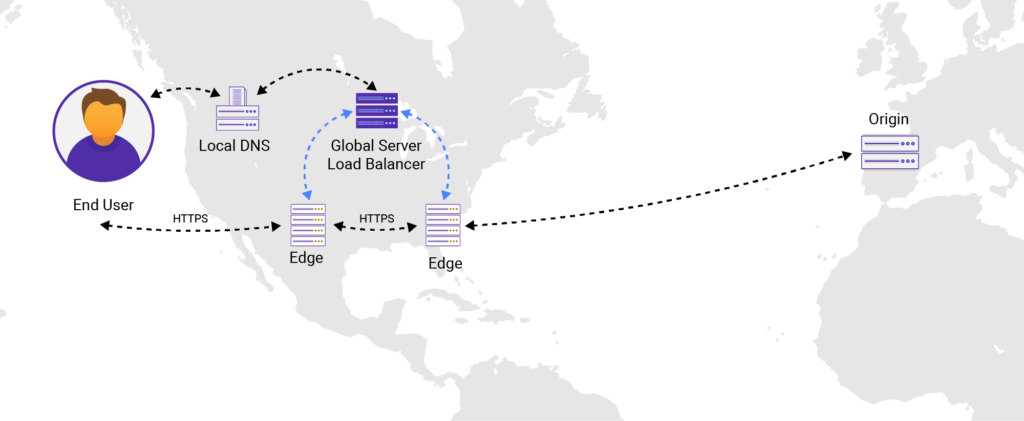
CDNs use DNS and global load balancing to route users to the nearest edge server for faster and more reliable delivery.
headless
2. Caching and Content Delivery
Once the request reaches the edge server, the CDN checks whether the content is already cached:
- Cache Hit: The requested resource is already stored at the edge and is delivered immediately from the edge server.
- Cache Miss: The edge server retrieves the resource from the origin server, serves it to the user, and stores a cached copy for future requests.
Caching reduces repeated requests to the origin server and is the primary driver of CDN performance improvements.
headless
3. Connection Optimization
CDNs also optimize how data is transferred between the user and the origin server.
- TCP and TLS termination reduce round-trip time for handshakes and improve secure delivery speed.
- Dynamic acceleration speeds up uncached or dynamic content (such as APIs or logged-in sessions).
- Protocol optimization supports HTTP/2, HTTP/3, and QUIC.
These optimizations reduce latency and improve delivery speed for users across different regions.
What are the Benefits of Using a CDN?
A CDN improves website performance, scalability, and security by delivering content from geographically distributed edge servers closer to users instead of a centralized origin. For a detailed breakdown, explore the full benefits of a CDN.
headless
Faster Content Delivery and Lower Latency
By caching assets at edge locations, CDNs reduce the distance data must travel. This can reduce Time to First Byte (TTFB) and improve Core Web Vitals such as LCP, which directly impacts user experience and search performance.
headless
Reduced Origin Server Load
Caching content at the edge decreases the number of requests sent to the origin server, lowering bandwidth usage, reducing infrastructure strain, and improving backend stability.
Improved Availability and Reliability
Distributed edge networks provide built-in redundancy, failover, and traffic distribution, ensuring consistent uptime even during traffic spikes or infrastructure failures.
Global Scalability
CDNs handle large volumes of traffic across multiple regions without requiring additional origin capacity, enabling websites to scale efficiently as demand grows.
Enhanced Security and DDoS Protection
CDNs act as a protective layer by filtering malicious traffic, mitigating DDoS attacks, and preventing direct exposure of the origin server to potential threats.
Better User Experience and SEO
Faster websites improve user experience and can positively impact Core Web Vitals and search rankings.
What are the Key Components of a CDN?
A CDN consists of several components that work together to deliver content quickly and reliably:
- Edge servers : Distributed servers that cache and deliver content to users from nearby locations.
- Points of Presence (PoPs): Physical data center locations that contain multiple edge servers and handle regional traffic.
- Origin server : The primary source of content, used when the requested data is not cached at the edge.
- Cache system: Controls how content is stored, updated, and expired based on caching rules.
- Routing layer: Directs user requests to the most appropriate edge server using technologies such as DNS or Anycast.
Together, these components allow a CDN to deliver content efficiently across global networks.
What Type of Content Can a CDN Deliver?
A CDN can deliver both static and dynamic content by caching and accelerating data across globally distributed edge servers.
- Static content: Images, CSS, JavaScript, fonts, and downloadable files that can be cached and reused across requests.
- Dynamic content: Personalized pages, APIs, and real-time data accelerated using optimized routing and persistent connections.
- Streaming media: Video and audio content delivered using adaptive bitrate streaming for smooth playback.
- Web applications: HTML and application assets served with reduced latency and faster rendering times.
- Software downloads: Large files such as installers and updates are distributed efficiently across regions.
Modern CDNs support a wide range of content types, combining caching with network optimization to improve delivery performance.
CDN vs. Web Hosting
A CDN does not replace web hosting. It works alongside it. Web hosting stores website files on an origin server, while a CDN delivers content from global edge servers.
| Category | Web Hosting | CDN |
|---|---|---|
| Primary Role | Stores and serves website files | Delivers content from edge servers closer to users |
| Core Function | Hosts origin content and applications | Caches and accelerates content delivery |
| Position in the request flow | Final destination (origin server) | Middle layer (between user and origin) |
| Performance impact | Depends on server location and resources | Significantly reduces latency and load time |
| Traffic handling | Handles all origin requests | Offloads traffic from origin servers |
Common CDN Use Cases
CDNs are used across industries to improve performance, scalability, and reliability for latency-sensitive and high-traffic applications.
- Media and streaming platforms: Deliver live and on-demand video with reduced buffering and latency for large global audiences.
- E-commerce and retail: Maintain fast page loads during traffic spikes, where even small delays can impact conversion rates and revenue.
- Online gaming: Reduce latency by serving game assets and processing data closer to players for smoother gameplay.
- Education platforms: Support high volumes of concurrent users by delivering video and learning materials efficiently.
How to Choose the Best CDN Provider?
Step 1: Define your performance goals
Identify target regions, latency expectations, and key workloads such as video, APIs, or web applications.
Step 2: Evaluate global coverage
Check PoPs distribution and performance in your primary and emerging user markets.
Step 3: Test real-world performance
Compare latency, cache hit ratio, and throughput across multiple geographic locations.
Step 4: Assess security capabilities
Verify WAAP features, including DDoS protection, WAF, and API security.
Step 5: Validate scalability
Ensure the CDN can handle traffic spikes without degrading performance or availability.
Step 6: Review delivery capabilities
Confirm support for static, dynamic, and media content such as VOD and live streaming.
Step 7: Check integration and deployment
Evaluate setup complexity, configuration speed, and compatibility with your existing infrastructure.
Step 8: Compare pricing and support
Review cost structure, transparency, and availability of responsive technical support.
headless
Why Choose CDNetworks as Your CDN Provider?
Traditional hosting alone can no longer meet the performance expectations of modern applications. Choosing the right CDN is essential for delivering fast, reliable, and scalable user experiences. While many CDN providers promise speed and availability, the right solution must combine global reach, intelligent routing, and built-in security.
CDNetworks delivers a high-performance CDN platform designed to support demanding, global workloads.
headless
Key capabilities include:
- Global edge network: 2,800+ PoPs across 90+ countries and regions, with strong emerging market coverage such as LATAM and EMEA.
- Intelligent traffic routing (GSLB): Real-time traffic optimization for lower latency and higher reliability.
- Flexible deployment: Supports CNAME and Anycast with fast configuration updates.
- Media delivery: Supports VOD, OTT, and interactive live streaming with optimized delivery, including HLS, HTTP-FLV, and WebRTC.
- Integrated security (WAAP): Built-in DDoS protection, WAF, bot management, API security, and traffic filtering to secure applications and APIs.
- 24/7 support: Continuous global support and rapid issue resolution.
FAQ
1. What is a CDN, and what does it do?
A CDN (Content Delivery Network) is a distributed network of edge servers that caches and delivers content from locations closer to users.
For example, when a user in Japan visits a website hosted in the United States:
- Without a CDN, the request must travel across continents to the origin server
- With a CDN, content is served from a nearby edge server
This significantly reduces latency and improves page load time.
2. What is an example of CDN?
CDN providers such as CDNetworks operate globally distributed edge servers that cache and deliver website content from locations closer to users. For example, images, videos, and scripts are served from nearby data centers to reduce latency and improve load speed.
3. What is the difference between DNS and CDN?
DNS translates domain names into IP addresses to route requests, while a CDN delivers cached content from edge servers closer to users. DNS handles resolution, whereas a CDN focuses on performance, caching, and content delivery optimization.
4. Why would you use a CDN?
Using a CDN improves website performance by reducing latency and serving content closer to users. It also enhances scalability, reduces origin server load, increases availability, and provides protection against traffic spikes and DDoS attacks.